Agent Development Environment

BLXCode
BLXCode

One ADE.
Every agent. Multi workspace.

BLXCode 0.5.0 adds MCP servers, local and cloud agent providers, Kanban plans, Mermaid diagrams, HeartBeat memory indexing, push-to-talk, notifications, Vim mode, and 32 themes around one multiworkspace agent loop.

Version 0.5.0

Major ADE upgrade

MCP, local models, Kanban, diagrams, and a smarter workbench.

The latest landing context is centered on the v0.5.0 release: more providers, deeper planning surfaces, background memory services, app-wide status, and a redesigned BLXCode theme without changing the product's dark command-center look.

6

new text providers

32

themes

0

key for local Ollama / LM Studio

01

MCP server support

Register stdio or HTTP MCP servers in Settings and expose their tools to the in-app agent plus terminal CLI agents.

02

Local and cloud providers

Ollama, LM Studio, Hugging Face, Cloudflare Workers AI, Together AI, and Portkey join OpenAI, Anthropic, and OpenRouter.

03

Kanban plans and AI tasks

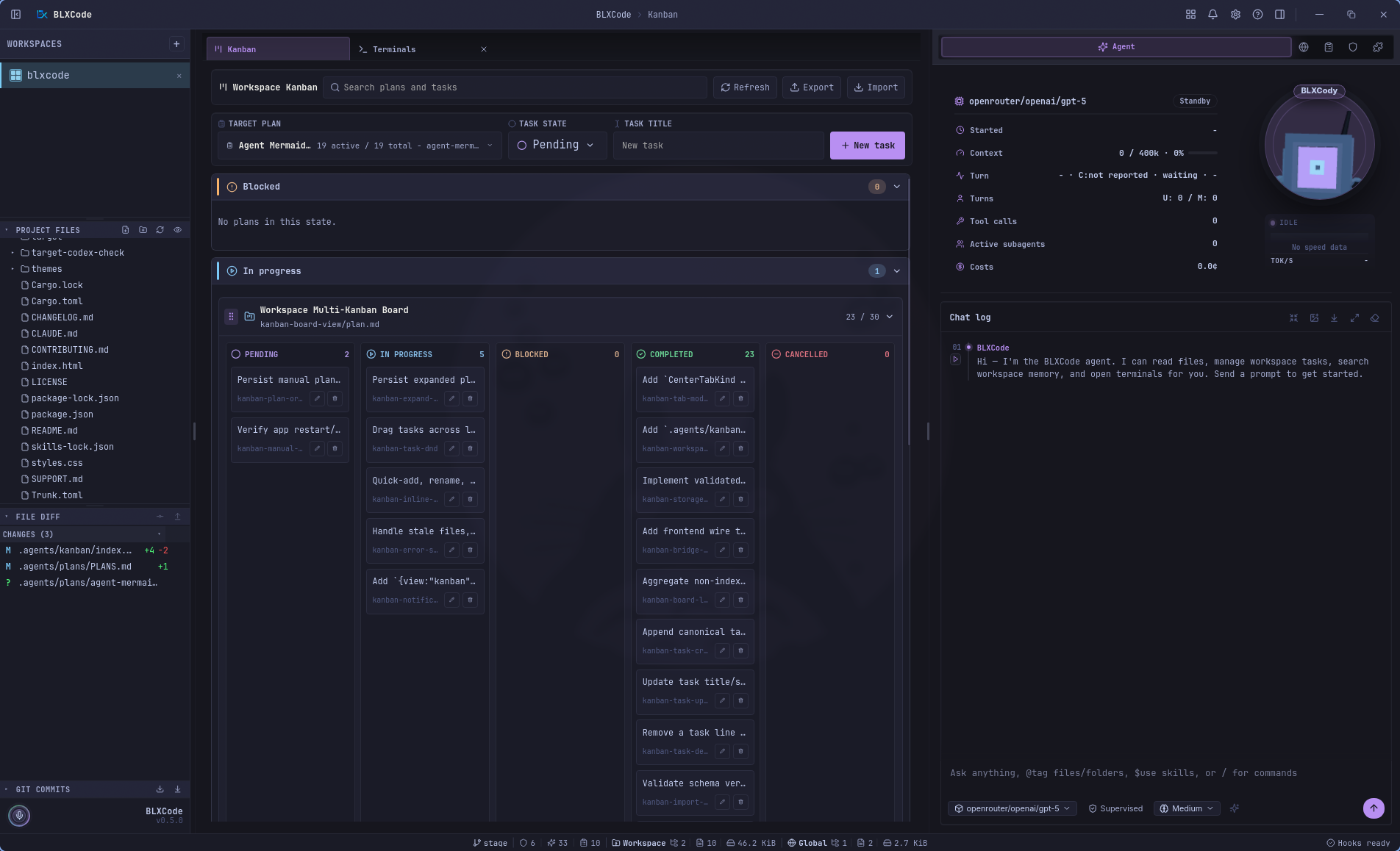
Plans in `.agents/plans/` become a center-tab Kanban board with drag-to-status moves, quick tasks, AI Plan, and AI Tasks.

04

Mermaid diagram gallery

The agent can create persisted plan diagrams, preview them in a gallery, and export them to Markdown or PDF.

05

HeartBeat memory indexing

A background runtime keeps generated memory notes fresh across open workspaces and reports status in Settings.

06

Status, updates, and voice

Titlebar notifications, a bottom status line, beta updates, push-to-talk with Whisper, Vim mode, named terminals, and session compaction round out the release.

Core capabilities

Multi everything — without dashboard chaos.

One grid, many providers, MCP tools, plans, memory, voice, and code context.

Multiworkspace

Switch projects without losing context.

Multiterminals

Up to 16 terminals per workspace — parallel, shared, focused.

Multilanguage

14 locales — UI, agent, and system copy from English to 繁體中文.

Plan Manager

Markdown plans in `.agents/plans/` with task sync, Kanban status lanes, AI Plan / AI Tasks, and Load into Agent.

Coordinated subagents

Scout, review, and security analyst runs in parallel — live timeline cards, shared provider and model.

Agent harness tools

Shell, Git, workspace search, web research, terminal-agent control, and MCP tools — core skills with lazy docs.

Context handoff

Memory, plans, tasks, and images → any terminal slot or the BLXCode Agent.

Rules & Skills

Expandable rule and skill cards — inline edit, create rules, Core/User tabs, git/npm/local install.

Sidebar explorer

Project file tree and git graph in the left rail — refresh, collapse, persisted per workspace.

Multiprovider

BLXCode Agent: OpenAI, Anthropic, OpenRouter, Ollama, LM Studio, Hugging Face, Cloudflare, Together AI, and Portkey.

Multiprovider CLI

Claude, Codex, Gemini, Cursor, OpenCode — side by side in the grid.

Resumable Sessions

Pick up workspace and CLI sessions exactly where you left off.

File & code preview

Click any file in the sidebar — images, video, Markdown, Mermaid, and 60+ code languages render through the shared CodeMirror editor.

Right-click handoff

Select a code range, right-click → send the snippet to any terminal, attach to the agent, or wrap it in a context block — across workspaces.

Policy doc banners

Bare `LICENSE`, `CONTRIBUTING`, `README`, `SECURITY`, `CHANGELOG` (with or without `.md`) render as Markdown with a kind-specific hero banner and icon.

Drag & drop terminals

Grab a terminal slot by its grip handle and reorder the grid — PTYs, agent labels, and split panes follow without restarting.

BLXAgent Provider

OpenAIAnthropicOpenRouterOllamaLM StudioHugging FaceCloudflare Workers AITogether AIPortkey

CLI Provider

ClaudeCodexGeminiCursorOpenCode

Multilanguage

14 locales. One surface.

UI, agent, and system copy in your language — from English to 繁體中文.

Active locale

Deutsch

de_de.rs

locales/

  • de_de.rs
  • en_us.rs
  • es_es.rs
  • fr_fr.rs
  • hu_hu.rs
  • it_it.rs
  • ja_jp.rs
  • ko_kr.rs
  • pl_pl.rs
  • pt_br.rs
  • ru_ru.rs
  • zh_cn.rs
  • zh_tw.rs
  • mod.rs

ADE Workflow

From workspace to agent loop — in one grid.

Terminals, browser, memory, plan manager, rules, and skills share one harness. The agent orchestrates; you stay in flow.

ade.harness — node 01/08workspace
ADE workflow connections

node·01

Workspace

node·02

16× Terminals

node·03

BLXAgent

node·04

Browser

node·05

Memory

node·06

Plans

node·07

Skills

node·08

Rules

x · 00
x · 99
Pipeline · 8 stages● live
readoutworkspace.rs

Switch projects without losing context. Tabs persist.

In the product

Looks like your daily workflow — feels like a command center.

  • Center tabs — pinned Terminals, shared file preview, docked Settings; tabs are closeable with a 3 s confirm on Terminals, Settings opens without a workspace
  • File preview — images, video, Markdown + Mermaid, and 60+ code languages with line numbers, syntax highlighting, and drag-range row selection
  • Right-click handoff — send a code snippet to any terminal slot (across workspaces) or attach it to the BLXCode Agent with one click
  • Policy doc banners — `LICENSE`, `CONTRIBUTING`, `README`, `SECURITY`, `CHANGELOG`, `AUTHORS`, `CODE_OF_CONDUCT` render with a kind-specific hero banner, even without an extension
  • Drag & drop terminal slots — grip handle reorders the grid live, PTYs and agent labels travel along
  • MCP servers — stdio/HTTP servers with on/off switches, connection tests, in-app agent tools, and CLI config sync
  • Workspace Kanban — pinned center-tab board with nested task lanes, drag-to-status moves, search, quick tasks, and layout import/export
  • Mermaid diagrams — agent-authored plan diagrams with a centered gallery and Markdown/PDF export
  • HeartBeat + Memory Indexer — background services keep workspace memory fresh and report status in Settings
  • Notifications + status line — titlebar bell feed, deep-link targets, bottom context chips, Git branch, editor position, plan/memory metrics, and update state
  • Code editor — CodeMirror 6 preview/edit path, Vim mode, cursor position status, editor shortcuts, folding, and right-click handoff in read-only preview
  • Push-to-Talk — local Whisper or cloud transcription routed to the agent composer, terminal, text input, or clipboard
  • 32 app themes — redesigned BLXCode dark/light, BLXCode Legacy, brand light counterparts, cool light designs, Claude Code dark, global radius/font/font-size controls
  • Centralized API Keys — LLM and web-search providers in one keyring-backed pane
  • BLXCode Agent — subagents, per-turn metrics, session cost, harness.ask_user cards
  • Expandable Rules & Skills panels — inline edit, Core/User skill tabs
  • Plan Manager with status filters, grouped sections, and Load into Agent
  • Built-in browser for docs, APIs, and live previews
  • Sidebar project files and git commit graph (resizable panels)
  • STT & TTS and chat maximize for longer agent transcripts

BLXCode Agent

One workspace assistant — rules, plans, and tools in every turn.

The agent is the orchestration layer of the ADE: binding rules, core skills, coordinated subagents, shell and Git tools, and resume from plans and tasks — then handoff to terminals and CLIs when you need provider-native sessions. Screens in the product gallery.

Per-turn flow

  1. 1. Read active rules — binding, non-negotiable.
  2. 2. Load matching skills when the task needs them.
  3. 3. Resume from `task_list` / active plan if you said continue or weiter.
  4. 4. Pull memory, plans, and project context as needed.
  5. 5. Execute — files, terminals, browser, handoff to CLIs.

Coordinated subagents

Ask for parallel scout, review, or security runs — up to five per turn, live expandable cards in the chat timeline, one synthesized reply.

Harness-driven turns

Unified tool dispatch: files, shell, Git, workspace search, web, memory, plans, rules, and skills — slim prompt with lazy core skill docs.

Rules & Skills management

Expandable cards in the right panel — preview SKILL.md on expand, edit rules inline, create rules, Core/User skill tabs with install from git/npm/local.

Plans panel

Editor and preview with status filters, grouped plan sections, inline create/edit, and Load into Agent.

Mandatory turn checklist

Every turn starts with active rules, matching skills when needed, then resume detection (continue / weiter) from tasks and plans before executing work.

Multimodal & voice

Attach images for vision providers. STT/TTS loops and chat maximize give more room for long agent transcripts.

Release highlights

Summaries below are curated for the site — full notes live on GitHub when we tag a release. What should ship next? Drop it in Ideas.

MCP server support, six new agent providers (Ollama, LM Studio, and more), a workspace Kanban board, agent-authored Mermaid diagrams, a HeartBeat-driven Memory Indexer, app-wide notifications and status line, Vim mode, a beta update channel, plus the redesigned BLXCode theme, push-to-talk with local Whisper, AI plans, named terminals, and a custom cross-platform titlebar.

Highlights

  • **MCP (Model Context Protocol) server support** — register stdio/HTTP MCP servers in **Settings → MCP** and expose them to both the in-app agent and the bundled terminal CLI agents, with per-server on/off switches and a live connection test.
  • **Six new agent providers** — Ollama, LM Studio, Hugging Face, Cloudflare Workers AI, Together AI, and Portkey join OpenRouter, Anthropic, and OpenAI. Ollama and LM Studio need no API key and take a local **Server URL**.
  • **Workspace Kanban board** — a pinned center-tab Kanban view backed by `.agents/plans/`, grouping plans by status with nested task lanes, drag-to-status moves, quick task creation, search, and layout import/export.
  • **Agent-authored Mermaid diagrams** — the agent can generate diagrams as first-class objects, persisted next to their plan and rendered in a centered diagram gallery with **Save As** export to Markdown or PDF.
  • **HeartBeat runtime + Memory Indexer** — an internal orchestrator (clamped 10-minute to 24-hour interval) runs background services; the first is a Memory Indexer that keeps generated notes fresh across open workspaces. New **Settings → HeartBeat** tab.
  • **App-wide notifications + status line** — a titlebar bell feed with deep-link targets, plus an always-visible status bar showing rules/skills counts, memory scope, active editor, Git branch, plans/memory metrics, and captured Claude usage.
  • **Beta update channel** — a **Stable / Beta** switch in **Settings → App**, prerelease-aware version resolution, and a background update service that checks every 10 minutes and notifies you when a release is found.
  • **Redesigned BLXCode theme + 32 themes** — the flagship dark/light look is now a Tokyo Night × Dracula fusion; the previous GitHub-blue default lives on as **BLXCode Legacy**. 16 dark + 16 light, including five brand light counterparts, five cool light designs, and the warm **Claude Code** dark theme.
  • **Custom cross-platform titlebar** — token-themed, with a brand cluster, native window controls, centered workspace breadcrumbs, a compact **NAVIGATE** quick menu, a notifications bell, and a Help/About menu.
  • **Roundings & Font** — theme-independent appearance controls: a corner-radius scale (Sharp / Default / Rounded / Extra) and a bundled monospace font (JetBrains Mono) or a system monospace face.
  • **Code editor with Vim mode** — a dedicated **Settings → Code Editor** tab with a Vim key-bindings switch (default on) for both the editor and read-only preview, plus rebindable editor shortcuts.
  • **Push-to-Talk (PTT)** — hold a key, speak, and route the transcript to the agent composer, an active terminal, a text input, or the clipboard. Local-first via a warm `whisper.cpp` model with an optional cloud mode, plus a built-in Whisper model manager.
  • **AI Plan and AI Tasks** — turn a short prompt into a full Markdown plan (with an optional `## Tasks` section) without leaving the Plans panel.
  • **Named terminals** — swap `#1`, `#2`, … for friendly agent names (Devon, Tom, Mia, …) and double-click a terminal header to give it a custom name. The BLXCode Agent knows the names too.
  • **Context-window meter and Session compaction** — see `used / max · NN%` in the chat header, compact the conversation into a dense briefing, and let **Auto-compact** do it for you when occupancy crosses the threshold.
  • **3D Drobo agent orb with 2D fallback** — the agent voice orb is now a Three.js model that follows the cursor, recolors from theme tokens, and reacts to recording states. Toggle back to the flat 2D logo in Settings.
  • **VS Code-style Git commit graph** — structured lanes, colored nodes, click-to-expand file lists, and a hover card with **Open on GitHub** when the origin can be mapped.
  • **Memory panel as a center tab** — open Memory in the workbench's center tab, with a wider default file/category column and a **Split View** toggle to keep the terminal grid visible. Memory settings now live in their own **Settings → Memory** pane.

New — Theme system and appearance

  • **Roundings & Font** — global theme-independent controls in **Settings → Appearance**. Roundings scales the new `--radius-{xs,sm,md,lg,xl}` token set; Font overrides `--font-mono` for the workbench and the xterm terminals (terminals re-fit on change).
  • **Redesigned BLXCode theme + BLXCode Legacy** — Tokyo Night × Dracula for the flagship; the previous default lives on as **BLXCode Legacy / BLXCode Legacy Light**.
  • **Ten new light themes** — five brand light counterparts (Tokyo Night Light, Nord Light, GitHub Light, Ayu Light, Atom One Light) and five custom cool designs (Winter Light, Paper Light, Alpine Light, Frost Light, Lilac Light).
  • **Claude Code dark theme** — warm-charcoal with a coral accent, replaces the near-redundant `github-dark` slot.
  • **Global font size** — an app-wide **font size** stepper (small/medium/large/extra) in **Settings → Appearance** overrides a central `--font-size-base` token used by the workbench, cards, and status bar.

New — Agent and chat

  • **3D Drobo agent orb** — interactive Three.js model (`public/assets/Drobo.glb`) that follows the cursor, recolors from theme tokens, reacts to recording/transcribing states, and falls back to the 2D `B` logo. A new **Agent orb** switch in **Settings → BLXCode Agent** picks between 3D Drobo (default) and 2D logo.
  • **Context-window usage meter** — `used / max · NN%` in the chat header with a thin progress bar that turns warning past 70% and danger past 85%. Maximum is resolved from the provider's own model metadata (OpenRouter `context_length` cached per model) with a static fallback table for direct providers.
  • **Session compaction** — a **Compact** button summarizes the running conversation into a dense briefing and starts fresh. **Auto-compact** runs the same path automatically once occupancy crosses a configurable threshold (default 85%, range 50–95%) and never interrupts a turn.
  • **Agent session stats panel** — the Agent hero now uses the left column for a compact, unframed live stats panel (provider/model + state chip, session start time, context-window mini meter, turns, total tool calls, active subagents, accumulated session cost) while the Drobo orb stays on the right.
  • **Configurable tool-loop limit** — the per-turn ceiling on tool-call rounds is now a number field (1–500, default 36) in **Settings → BLXCode Agent**. Applies to both the OpenAI-compatible and Anthropic loops.
  • **Send / Stop as a single toggle** — the compose bar is one button that shows **Send** while idle and **Stop** while a turn is running.
  • **Thinking blocks merge into the following model-round line** — a finished *Thinking* block immediately followed by a tool-bearing *Model Round* collapses into a single row so model rounds sort correctly into the sequential numbering.
  • **Per-message Play button only when voice is configured** — the text-to-speech action on a chat message surfaces only when TTS is enabled **and** the selected TTS provider actually has an API key.
  • **Terminal CLI-agent control and prompt enhancement** — the BLXCode Agent can now drive interactive terminal agents (Claude Code, Codex, Gemini, OpenCode, Cursor) end to end through the harness. New terminal-control tools list/target slots, send raw keys or attached BLXCode context, read recent output, wait for new or settled output with sequence ids, and interrupt stuck sessions with Ctrl+C. A new embedded core skill, `prompt-generating`, teaches the model how to scope prompts for BLXCode chat, terminal CLI agents, subagents, and user-facing replies, and the system prompt now requires consulting that skill before substantive CLI-agent handoffs. A per-workspace **Enhance prompt before send** toggle rewrites the draft through an isolated one-shot provider call before submitting it as the actual user turn, without mutating chat history, tools, memory, plans, or timeline state.
  • **Agent timeline refactor** — the chat timeline now renders consecutive tool activity as slim grouped status rows for the main agent and subagent cards, preserving per-tool icons, argument summaries, status indicators, expandable details, metrics, path aggregation, and `×N` counts through a reusable `tool_group` component. Model turns that mutate files end with a **Changed files** summary card built from `git_status_changes` (totals additions/deletions, collapsible directory tree with per-file stats, click-to-open diff view) without adding new backend protocol fields. The old mode toolbar + single-line input is replaced by a modern auto-growing composer with a footer model picker, Plan / Build / access mode popover, thinking-level selector, busy-safe controls, and a send/stop orb. New components live in dedicated `agent_panel/{tool_group,changed_files_card,composer}` folders with token-only CSS.
  • **Agent Thinking stream preview** — while the current turn is actively thinking, a compact inline preview appears under the Drobo orb and follows the newest open *Thinking* block from the timeline. It autoscrolls as reasoning text streams in, uses the active theme radius/color tokens, and disappears in compact chat mode.
  • **Agent tool list output formatting** — JSON-array tool results (e.g. `rules_list`, `skills_list`) render as readable compact lists in the chat timeline instead of raw one-line JSON blobs. The agent still receives the original JSON internally; a UI-only presentation layer extracts `title` / `name`, `summary`, category/kind, and small metadata chips, with a tolerant fallback that can still show complete list items from truncated array prefixes.
  • **Cached token metrics** — the event stream now surfaces Anthropic/OpenAI `cache_creation_input_tokens` and `cache_read_input_tokens` as first-class fields. The usage summary and agent panel show the cached-vs-fresh ratio alongside prompt/completion tokens, and the per-message metrics popover exposes the full breakdown.
  • **Agent panel compact mode + compact tasks bar** — a new compact chat layout collapses the agent hero into a denser grid (stats and orb side-by-side), and the chat-side **Tasks** list is rebuilt as a slim, theme-token status bar that is collapsed by default with per-task status pills and an expandable detail view. The subagent timeline row is split into its own component.
  • **Terminology refactor (Harness → Agent)** — the legacy "Harness" / "BLXCode Harness" wording is replaced with **Agent** / **BLXCode Agent** across all locales, the agent panel UI, the system prompt, tool catalogs, plan/task UI, and the docs (Rust service identifiers are kept to avoid cross-cutting renames).

New — Agent providers, MCP, and onboarding

  • **Six new text providers** — Ollama, LM Studio, Hugging Face, Cloudflare Workers AI, Together AI, and Portkey join OpenRouter, Anthropic, and OpenAI. A central provider registry resolves OpenAI-compatible endpoints, auth modes, model discovery, reasoning support, and curated fallback models. Ollama and LM Studio require **no API key** and expose a localized **Server URL** field for LAN or remote `/v1` servers; Cloudflare stores its Account ID as a non-secret setting while tokens live in **Settings → API Keys** with `BLX_*` environment fallbacks. Main chat, one-shot utilities, prompt enhancement, AI plans/tasks, AI commit messages, compaction, MCP tools, and subagents all run through the generalized compatible loop.
  • **MCP (Model Context Protocol) server support** — register stdio (command/args/env) or HTTP (url/headers) servers in **Settings → MCP**, each with its own on/off switch, add/edit/remove, and a per-server **connection test** (`initialize` + `tools/list` with a live tool count). For the in-app agent, enabled servers connect at session start and their tools are injected as `mcp.<server>.<tool>`. For the terminal CLIs (`claude`, `codex`, `gemini`, `opencode`, `cursor`), enabled servers are translated into each CLI's native project-scoped config in the workspace root — merge-safe and tracked in a `.blxcode/mcp-managed.json` sidecar (remote SSH workspaces are skipped). Because the tool set is fixed at session start, the MCP pane shows a session-reset reminder and a reload-required hint after any change. A new embedded `mcp` skill teaches recognition, the enable/reset lifecycle, and treating MCP output as untrusted data.
  • **Per-terminal CLI-agent model and effort selection** — Create Workspace now lets each fleet agent row pick the CLI-agent model and, where supported, a reasoning/effort level. Selections persist on workspaces and presets, stay aligned through reorders/swaps/transfers, and map into the right launch mechanism (Claude via `CLAUDE_CODE_EFFORT_LEVEL`, Codex via `-c model_reasoning_effort=…`, others model-only for now).
  • **OpenCode 1.0+ is a recognized terminal CLI agent** — added to the agent roles catalog and terminal agent profiles as a `terminalAgentSwarm`-capable role with its own model and effort picker.
  • **Agent onboarding + nickname** — a one-time startup dialog prompts for a **display name** (validated against a badword list; blank falls back to `BLXCodey`) and a **default session role**. The nickname is injected into the system prompt for both text and voice paths and rendered as a glassy badge on the Drobo orb. The default role is editable from the dialog, **Settings → Agent**, and **Settings → Workspace**, and seeds new Create Workspace drafts.

New — Voice and push-to-talk

  • **Push-to-Talk (PTT)** — hold a key, speak, drop the transcript into a target of your choice. Targets: agent composer (auto-submit optional), active terminal (auto-submit appends Enter), active text input, or clipboard. Target mode follows the current focus or is remembered at PTT start.
  • **Live partial transcript** — periodically re-decodes the captured audio (no native streaming from `whisper.cpp`); toggle off to save CPU.
  • **Collision state machine** — while TTS is playing, PTT can **Stop** TTS, **Pause** TTS, or **Block** recording (default) to avoid a feedback loop. A second microphone session is refused.
  • **Whisper model manager** — filterable list of downloadable `whisper.cpp` models (All / Standard / Quantized / Turbo / Large) with per-model size, language, Speed/Accuracy ratings, and a "best for" hint. Downloads are resumable (HTTP `Range`) with a live progress bar, transfer speed, sha256 verification, and atomic rename. Installed models show **Use** and **Delete**.

New — Plans, tasks, and Kanban

  • **Workspace Kanban board** — every workspace gets a pinned center-tab `0` Kanban view backed by `.agents/plans/` with layout metadata under `.agents/kanban/index.json` (the Terminal tab stays the active default). It groups plans by the same derived states as the Plans side panel and nests task-state lanes per plan, with quick task creation, inline rename/delete, search, refresh, layout import/export, and a titlebar Navigate shortcut.
  • **Interactive Kanban drag and drop** — move whole plans between status sections or reorder them through dashed drop zones with a cursor-following preview; subtask drops are constrained to their parent plan and can change both lane and Markdown order. Plan drops write back to the canonical Markdown task lines, and Kanban shares a Plans revision signal with the right-side Plans panel so the two stay in sync.
  • **AI Plan and AI Tasks** — header buttons in the Plans panel open a dialog where a short prompt is turned into a full Markdown plan. **AI Plan** lets you toggle whether tasks are created; **AI Tasks** forces tasks on. While generating, the prompt box shows a shimmer animation; afterwards you get a scrollable Markdown preview with **Save / Regenerate / Cancel**.
  • **Plan card quick actions** — a collapsed plan card now leads with **Show in Kanban** (which opens the pinned Kanban tab, expands the matching plan, and highlights it) alongside **Load into BLXCode Agent** and **Rename**, so loading a plan no longer requires expanding the card. The destructive Remove action stays in the expanded card body.
  • **Per-plan folders** — durable plans now live at `.agents/plans/<slug>/plan.md` while the protected index stays at `.agents/plans/PLANS.md`. Plan APIs and agent tools accept legacy `slug.md` inputs but return canonical `slug/plan.md` paths, and existing flat plan files auto-migrate in the background with statusbar progress.
  • **Collapsible plan status groups with descriptions** — in the *All* view, each status group header toggles open/closed and carries a one-line description of what the state means. The protected `PLANS.md` index file is no longer listed as a plan card or counted toward the status tabs.

New — Mermaid diagrams

  • **Agent-authored Mermaid diagrams** — the BLXCode Agent can generate diagrams as first-class objects via `mermaid_create` and `mermaid_create_many`. When a `plan_slug` (and optional `task_id`) is supplied, each diagram is **persisted next to its plan** under `.agents/plans/<slug>/diagrams/<id>.mmd` with a `diagrams.json` manifest, so plan/task diagrams travel in git and are removed when the plan folder is; without a `plan_slug` the diagram is an ad-hoc chat diagram.
  • **Centered diagram gallery** — a new center tab renders a plan's diagrams as a horizontal thumbnail slider on top with the active diagram large below, using the vendored Mermaid renderer (`securityLevel: strict`). Each plan card with persisted diagrams gains a button that opens the gallery, and diagrams export to **Markdown** (YAML front-matter + fenced `mermaid` block) or **PDF** (rendered SVG via `svg2pdf`) through a native **Save As** dialog.

New — Workspaces

  • **Custom cross-platform titlebar** — token-themed brand cluster, native window controls, sidebar/right-panel toggles, centered workspace breadcrumbs, and a live focused-terminal crumb. The right side adds a compact **NAVIGATE** menu (Terminals, New terminal, Plans, Memory, Skills, Settings, fullscreen) plus a future-ready Notifications popover.
  • **Terminal view modes: Grid, Canvas, and Swarm** — the live terminal tab can switch between the standard grid, a freeform Canvas with draggable/resizable terminal nodes and `stdin` / `stdout` routing edges, and a Swarm graph that visualizes the BLXCode Agent control hub plus terminal-agent nodes.
  • **Named terminals** — switch from `#1`, `#2` slot numbers to friendly agent names (Devon, Tom, Mia, …) under **Settings → Workspace → Terminal naming**. Names are drawn deterministically from each terminal's stable `slot_id`, can be overridden per slot, and the backend is unchanged — `slot_id` is still the technical identity everywhere.
  • **Agent knows the names** — `harness.list_terminals` returns `name` + `namingMode` for every slot, and `harness.send_terminal_keys` / `send_agent_context` / `read_terminal_output` accept a `name` argument alongside `slotId` and `agentSlug`.
  • **Sidebar workspace previews** — terminal-count badges are replaced by tiny workspace-colored grid previews that mirror each workspace's terminal layout.
  • **Welcome-screen "Create Workspace" action** — the empty/welcome screen leads with a prominent **Create Workspace** call-to-action above the Agent/Memory/Browser/Kanban destinations row, backed by a real rebindable shortcut (`Ctrl+B` then `C`) that appears in **Settings → Shortcuts**. Destination cards hide their keybinding hints when the workspace panel is narrow so the chips no longer crowd the labels.
  • **Recent workspaces** — the Create-Workspace layout step lists previously-opened directories below the *Working Directory* field as one-click rows, and the welcome screen gains a richer **Recent workspaces** cluster with a thin "×" to forget a path.

New — Memory and rules/skills

  • **Rules, Skills, and Plans filtering** — the Rules and Skills panels share the same category filter row, themed separator, and live search structure, filtering by title, description, source/category metadata, and category selection. The Skills tab is scoped to user/workspace skills only.
  • **Plans live search** — the Plans panel mirrors the search interaction with its own live search field below the status filter tabs.
  • **Memory panel: center tab opener and count summary** — an "Open memory in centered tab" button sits in the collapsed-header summary alongside a live `X files / Y cats` count (templates and the built-in `memory` pseudo-category excluded from the category total).
  • **Memory panel: default workspace index and exclusive group open** — opening a workspace auto-loads its `.agents/memory/README.md` index as the active note. Category groups are mutually exclusive — opening a category auto-closes the previously open one.
  • **HeartBeat runtime + Memory Indexer** — a new internal, plugin-ready HeartBeat orchestrator runs background services on a clamped 10-minute to 24-hour interval, with global settings, enable/disable state, status snapshots, and a manual **Run now** in a new **Settings → HeartBeat** tab. The first service, **Memory Indexer**, indexes all open workspaces asynchronously, keeps per-workspace runs from overlapping, and marks a run stalled after three consecutive skips. Generated notes are written with frontmatter directly into the existing Memory categories (`rules`, `skills`, `plans`) for both workspace and global memory, so the Memory graph and Graph3D clustering consume them without a separate category. **Settings → Memory** shows indexer stats plus independent provider/model settings, and the left statusbar rotates active processes every three seconds.
  • **Memory moved into a dedicated Settings pane** — a new **Settings → Memory** category centralizes the memory right-panel toggle (now **off by default** for new users), folder-grouping and split-view toggles, the agent memory pointers flow, and the architecture-rebuild controls. The right-sidebar Memory tab is removed in favor of the center tab plus this pane.

New — Notifications and status line

  • **Notifications + titlebar feed** — a new notification system collects, dedupes, and surfaces async events across the app (agent completions, plan/task state changes, blocked tasks, MCP reload hints, background update availability). The titlebar gains a **bell** with an unread badge that opens a popover; each item can carry a deep-link target (`kanban`, `update`, `agent`, …) so clicking it navigates to the right tab or dialog. Kind, badge counts, and targets persist across restarts.
  • **App status line** — an always-visible bottom status bar surfaces low-noise context for the active workspace: a rules/skills chip group, the active memory scope, the focused editor (`file.rs · 42:13`), the Git branch, and plans/memory metric chips that jump to the matching center tab. It also shows **Claude usage** captured from the focused Claude session's status line and a discreet update indicator, plus a **Help** button on the right.
  • **In-app log panel and logging service** — a new `LoggingService` writes structured events to a rotating log file (debug/info/warn/error) and surfaces them in an **App log** panel reachable from the Help menu and titlebar settings area; MCP lifecycle events, hook install outcomes, and async command errors all flow through it.
  • **Hook installation dialog and status** — a `HookStatusService` tracks which CLI-agent hooks (Claude, Codex, Gemini, OpenCode, Cursor) are installed for the active workspace, and a themed dialog prompts you to install/refresh the missing ones, with a 3-column hooks grid and icon-only status pills in **Settings → App**.

New — Updates and Help

  • **Beta update channel** — a **Stable / Beta** segmented control in **Settings → App → App updates** (default Stable) persists per app config. The Beta channel queries the GitHub Releases API (drafts skipped, prereleases included), picks the highest SemVer above the running build, and resolves `latest.json` from the concrete tag. Switching channel clears any pending update so an artifact from the other channel can never install. A background update service runs on startup (if auto-check is on) and every 10 minutes, dedupes a titlebar notification when a release is found, and stays silent for background "up to date" ticks.
  • **Help / About menu** — a titlebar **?** button opens a popover with product metadata (name, version, commit, channel), a link grid (Docs, Releases, Report issue, Discord, Sponsor), and an integrated *Check for updates* action.

New — Code editor

  • **Vim mode + editor shortcuts** — a dedicated **Settings → Code Editor** tab adds a **Vim key bindings** switch (default **on**) that enables `@replit/codemirror-vim` for the in-app editor and the read-only preview, living in its own CodeMirror compartment so toggling reconfigures the live editor without a remount. A **VIM** indicator shows in the status bar while a file tab is focused. New rebindable file editor/preview shortcuts (save, find, find & replace, go to line, toggle comment, fold/unfold, move/duplicate line, format) get their own section in **Settings → Shortcuts**, disabled with an inline hint while Vim owns the keymap.
  • **Cursor position tracking** — the editor publishes the caret line:column through a shared signal so the status line can render the focused tab's position and update on every selection change.

New — Git and remote

  • **VS Code-style Git commit graph** — structured lanes (colored lines, colored nodes, yellow selected node), one compact commit summary per row, click-to-expand file lists, and a hover/focus detail card with author, date, refs, short SHA, stats, and **Open on GitHub** when the origin URL can be mapped safely.
  • **Remote (SSH) settings redesigned as a master/detail view** — saved presets render as a grid of compact connection cards (name, `user@host:port`, auth method, session-resume mode, masked secret badge, default remote directory). Clicking a card opens a dedicated editor view with **Save / Delete / Back to list**. No secret values ever leave the backend.
  • **Update check dialog reuses the What's New release-notes view** — the update dialog now loads the same structured release notes used by the post-update screen, with current → available version, install/download progress, retry, restart, and **Later**.

New — Other

  • **File preview now uses the same CodeMirror 6 editor as edit mode, mounted read-only** — same syntax highlighting, line-number gutter, code folding, and selection in both modes. The right-click handoff menu (snippet → terminal / agent / clipboard) works in **both** modes.
  • **Architecture/memory indexing runs off the main thread** — the first-touch architecture rebuild and the manual `memory_rebuild_architecture` / `memory_lint_architecture` paths are now `async` and run on the blocking thread pool, so opening a large workspace no longer freezes the UI.
  • **Backend git / fs commands are now `async`** — `list_path_entries` and `git_is_repository` (now `Result<bool, String>`) join the rest of the git/fs commands on the blocking thread pool.

Improved

  • **Agent settings affordances are more direct** — the old sidebar push-to-talk tooltip styling was generalized into app-global `.blx-tooltip` / `.blx-tip-anchor` CSS. The Agent session stats panel deliberately avoids tooltips; its model/provider chip is a real button that opens **Settings → Agent Provider** directly.
  • **Memory center tab ergonomics** — **NAVIGATE → Memory** opens or focuses the Memory center tab. Inside the centered Memory view the files/categories column starts at double the normal minimum width, the redundant "Open memory in centered tab" button is hidden, and a **Split View** toggle keeps the terminal grid visible on demand.
  • **Rules and skills share the same category model** — each rule or skill can declare one optional `category` in Markdown frontmatter and its `index.json` entry; legacy rule `tags` arrays are migrated by taking the first tag as the category. Rule and skill cards show the category in a compact chip style.
  • **Agent composer model and mode controls** — the mode/access pill cycles directly on click (Supervised → Full access → Plan), model rows show provider metadata (context-window size, input/output pricing), the active model pins to the top, and you can star favorites to sort them ahead of the rest. The composer docks into the chat card with a soft timeline fade.
  • **Workbench splitter grips** — the sidebar/center/right-panel splitters (and the file-tree/commit-graph split) gain a thin centered grip line, a slightly larger hit target, and a subtle hover state.
  • **Workspace title prioritizes user input** — the titlebar title now resolves *user override → workspace config name → directory name*, and the Create-Workspace wizard stores the user-typed title rather than always recomputing it from the path.

Fixed

  • **Plan deletion now removes plan-linked Mermaid diagrams** — deleting a plan removes the entire canonical plan folder, including persisted Mermaid manifests and `.mmd` files under `diagrams/`, instead of leaving diagram sidecars behind. Covered by a new regression test.
  • **Plan card toolbar alignment** — the collapsed-card quick-action toolbar now lines up with the task-summary row, removing the awkward vertical gap.
  • **Welcome-screen Memory quick action opens the centered Memory tab** — the Memory card (and its `Ctrl+B` then `M` chord) now consistently drops you into the centered Memory experience instead of the right sidebar.
  • **Agent onboarding dialog sheet styling** — the one-time onboarding bottom-sheet is restyled to match the shared settings sheet chrome and gains a visible grab region on narrow viewports.
  • **Workspace tests compile after the Agent orb-mode setting addition** — the OpenRouter pricing test helper initializes the newer `AgentProviderSettings::orb_mode` field.
  • **Inactive Memory center tabs no longer remain visible beside Terminals** — the hidden center-panel selector is more specific, so switching back to **Terminals** hides the Memory center panel while keeping terminal surfaces mounted.
  • **Git commit graph polish after the VS Code-style refactor** — commit titles start directly after the relevant graph node and shift right only while extra branch lanes are active, the hover card is positioned from the hovered/focused row, and commit-detail loading is cached above the refreshed list (no periodic loading flicker).
  • **Rules panel descriptions and sidebar typography** — rule summaries skip YAML frontmatter and use the paragraph below `## Ziel`. The File Diff and Git Commits sidebar sections use the same compact font sizing as the Project Files tree.
  • **Push-to-Talk errors surface as localized toasts** — start failures show the microphone error, busy/TTS-collision rejects show the indicator hint, finalize failures map to no-model / model-load / generic messages, and failed transcript insertion reports a clear localized error.
  • **Plan card quick *Remove* button border no longer stands out** — the quick variant keeps the subtle icon-button border at rest and only resolves to a danger tint on hover.
  • **Model-round rows show the right line number** — the display line number is now decoupled from the stable expand-state key that was leaking `hash + 1` into the UI.
  • **The per-message Play (TTS) button only appears when voice is configured** — it shows only when TTS is enabled *and* the selected TTS provider actually has an API key set in **Settings → Voice**.

Removed

  • **highlight.js dependency removed** — the file preview no longer ships or lazy-loads the vendored `highlight.js` bundle (~127 KiB), and the heuristic Rust fold model that backed the old preview is gone. A single CodeMirror 6 bundle drives both preview and edit.

Good to know

  • Push-to-Talk local mode requires a downloaded Whisper-compatible model file (`<app-data>/voice/models/<id>.bin`). The local engine is compiled behind the `local-whisper` cargo feature; default builds support cloud PTT only.
  • The **default theme** is still `blxcode-dark` (now the redesigned Tokyo Night × Dracula look). Existing users land on it automatically; the previous default lives on as **BLXCode Legacy**.
  • The 10 new light themes are split into **five brand light counterparts** and **five custom cool designs**; the Claude Code dark theme replaces the redundant `github-dark` slot.
  • AI-generated plans and tasks reuse the same one-shot, non-streaming path that powers AI commit messages — no separate LLM stack, no chat conversation, no streaming events.
  • Named terminals change only the **display** layer; `slot_id` is still the technical identity used for PTY routing, `terminal_key`, and `sessions.json`. The backend is unchanged.
  • Session compaction runs a single non-tool provider call so it cannot enter a tool loop, and the visible timeline resets to a fresh chat to match.
  • MCP tools are fixed at session start. After adding, editing, removing, enabling, or disabling a server, reset the agent session (one-click button in the MCP pane) for the in-app agent, and reload the app for the terminal CLIs. MCP output is treated as untrusted data.
  • The six new agent providers cover **text** only in this release; the Image and Voice provider lists remain separate. Ollama and LM Studio need no API key — just a reachable `/v1` server URL.
  • The Kanban board lives on pinned center-tab `0` per workspace, but the Terminal tab stays the active default view when you open a workspace.
  • Persisted Mermaid diagrams travel in git with their plan and are deleted when the plan folder is removed; diagrams created without a `plan_slug` are ad-hoc chat diagrams and are not persisted.
  • The default update channel is **Stable**. Switching to **Beta** opts into prereleases and clears any pending Stable artifact (and vice versa) so you never install across channels.
  • The memory right-panel now defaults to **off** for new users; existing users keep their preference.
  • The full technical changelog lives in `CHANGELOG.md` in the repository.
  • Friendly release notes for each version live under `docs/releases/` and power the in-app **What's new** dialog.
BLXCode

MIT LICENSE · Open Source

By Bitslix. For builders.

BLXCode is free under the MIT license. Fork it, extend it, ship it.